Equations
Mathematics is set in the PDF, HTML and Word exports. Build a formula from a few pieces and put it on its own line or inside a line of text; each export writes it in its native form. Letters and digits in a PDF equation are real text you can select, and a Word export carries live Word equations that stay editable.
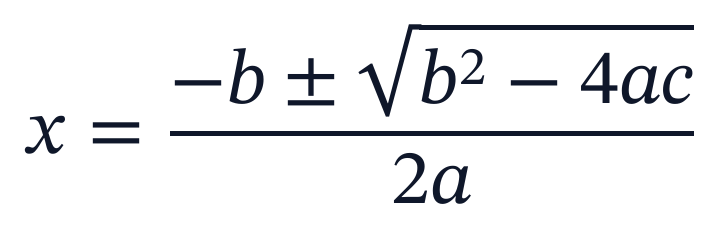
The formula above is one display equation:
use Quoin\Equation;
use Quoin\Math\Math;

Equation::of('x', '=', Math::frac(
    Math::row('-b', '±', Math::sqrt(Math::sup('b', '2'), '-', '4ac')),
    '2a',
))->center();
The builder lives in the quoin/math package, which quoin/core installs. It also works on its own, for formulas in web pages, email or Word files: see Math.
Building a formula
Quoin\Math\Math has one method for each shape. Wherever a method takes a node, a plain string works too; the rules below turn it into nodes.
| Method | Builds |
|---|---|
Math::row(...$parts) | Parts side by side. Strings and nodes mix freely. |
Math::frac($numerator, $denominator) | A fraction. |
Math::sqrt(...$content) | A square root. |
Math::root($radicand, $index) | A root with an index, such as a cube root. |
Math::sup($base, $superscript) | A superscript. |
Math::sub($base, $subscript) | A subscript. |
Math::subSup($base, $subscript, $superscript) | A subscript and a superscript on one base. |
Math::fenced($open, $close, ...$content) | Content between delimiters, such as ( and ). The delimiters stretch to fit what is inside. |
Math::matrix($rows, $fence, $align) | Rows of cells in aligned columns inside a fence. |
Math::cases($rows) | A left brace around left-aligned rows, for piecewise definitions. |
Math::text($text) | Literal text, such as a word in a formula. It is not tokenized. |
Math::subSup('x', 'i', '2');                            // x with i below and 2 above
Math::fenced('(', ')', Math::frac('a', 'b'));           // a tall pair of brackets
Math::row('f', Math::fenced('(', ')', 'x'), '=', Math::root('x', '3'));
Math::row(Math::text('speed'), '=', Math::text('distance'), '/', Math::text('time'));
Matrices and cases
Math::matrix() takes a list of rows, each a list of cells (strings or nodes). The fence is one of paren (the default), bracket, brace, bar, doublebar or none, and it stretches to the height of the grid. $align is center (the default), left or right for every column, or a list with one value per column (a short list repeats its last value). Math::cases() is a left brace around columns that are all left-aligned. A grid sits on the same line as a neighboring =, centered on the math axis.
Math::row('A', '=', Math::matrix([['1', '0'], ['0', '1']], 'bracket'));
Math::row('det', Math::matrix([['a', 'b'], ['c', 'd']], 'bar'), '=', 'ad − bc');
Math::row('|x|', '=', Math::cases([['x', Math::text('if x ≥ 0')], ['−x', Math::text('otherwise')]]));
No rows, or a row with no cells, throws InvalidArgumentException, as does an unknown fence or alignment. In MathML input, <mtable> is read as the same grid, with columnalign, rowalign and displaystyle honored on the table, and a lone opening bracket such as { before a table becomes a stretching fence. Attributes that are not drawn (rowlines, columnlines, frame, rowspacing, columnwidth, equalrows, equalcolumns, align, groupalign, rowspan, columnspan, and columnalign and rowalign on rows and cells) are reported as approximated, for example math <mtable> (rowlines is not drawn). columnspacing is drawn, and noted only when its value can't be read. In Word a grid is a live matrix (m:m).
Limits, accents and bars
Large operators take their limits as optional arguments. Math::sum() and Math::product() take the lower and upper limit; Math::bigOp($operator, $under, $over) does the same for any other operator. In a block equation the limits sit below and above the symbol; in a line of text they move beside it as scripts, so the line doesn't grow. Math::integral() always keeps its limits beside the symbol.
Math::row(Math::sum('n = 1', '∞'), Math::frac('1', Math::sup('n', '2')));
Math::row(Math::integral('0', '1'), 'x dx');| Method | Builds |
|---|---|
Math::sum($under, $over), Math::product($under, $over), Math::integral($under, $over) | A large operator with limits. Both limits are optional. |
Math::bigOp($operator, $under, $over) | The same for any operator character. |
Math::under($base, $under), Math::over($base, $over), Math::underOver($base, $under, $over) | Something below, above, or both above and below a base. |
Math::accent($base, $mark) | A mark over a base. $mark is a combining character such as U+0302. |
Math::hat($base), Math::tilde($base), Math::vec($base), Math::dot($base) | The common accents. |
Math::overline($base), Math::underline($base) | A rule as wide as the base. |
Math::overbrace($base, $label), Math::underbrace($base, $label) | A brace stretched across the base, with an optional label on its far side. |
Math::binom($top, $bottom) | A binomial coefficient: two lines between parentheses. |
Math::stack($top, $bottom) | Two lines like a fraction, without the rule. |
Math::aligned($rows) | Equations lined up on their alignment points, as in TeX's aligned. |
Math::middle($delimiter) | A delimiter inside Math::fenced() that stretches with it, such as the bar in a set. |
Math::big($delimiter, $size) | A delimiter at a fixed size, 1 to 4 (Math::BIG_SIZES). |
Math::xarrow($arrow, $over, $under) | An extensible arrow with optional labels above and below. |
Math::space($em) | Horizontal space of that many ems. A negative value pulls the next item back. |
Math::phantom(...$content) | Takes the size of its content and draws nothing. |
Math::styled($text, $variant) | Text in a MathML mathvariant, such as bold or double-struck. |
Math::row(Math::overline('x'), '=', Math::frac(Math::sum('i', 'n'), 'n'));
Math::underbrace(Math::row('a + b + c'), 'three terms');
Math::row(Math::binom('n', 'k'), '=', Math::frac('n!', Math::row('k!', '(n − k)!')));
Math::row(Math::styled('R', 'double-struck'), '∋', Math::styled('x', 'bold'));Math::aligned([['x + 2', '= 5'], ['x', '= 3']]);
Math::fenced('{', '}', 'x', Math::middle('|'), 'x > 0');
Math::row(Math::big('(', 2), 'a + b', Math::big(')', 2));
Math::xarrow('→', Math::text('heat'), Math::text('catalyst'));In Word, aligned() is written as a native equation array. In aligned(), cells alternate right- and left-aligned, so the second cell of each row starts at the alignment point (= 5). A pair has no gap inside it, and two em separate pairs. An arrow made with xarrow() is at least as long as KaTeX draws it and reaches past its labels.
styled() accepts normal, bold, italic, bold-italic, double-struck, script, bold-script, fraktur, bold-fraktur, sans-serif, bold-sans-serif, sans-serif-italic, sans-serif-bold-italic and monospace. An unknown variant, or empty text, throws InvalidArgumentException.
A block equation
Equation::of(...$parts) takes strings and nodes, like Math::row(). It sits on a line of its own, in display style: fractions and scripts are drawn large, and the equation takes the surrounding text's size and color.
- It uses the theme's
equationstyle, which by default is a bottom margin of 6 pt. Change that style, or style the equation itself, like any other box. - It aligns with text alignment:
->center()or->right()in PHP,text-align="center"in Blade. The default is left. - It never splits across pages.
- If it is wider than its box it overflows, like an overlong word. It does not wrap.
<x-doc::equation math="E = m c²" />
<x-doc::equation :math="$node" text-align="center" />
math takes a string, or a node you built with Math in PHP and passed to the view. A string that starts with <math is read as MathML instead. To write TeX, use the tex attribute (see TeX input).
An equation in a line of text
Span::math(...$parts) puts a formula inside running text. It is set in a compact style, with scripts and fractions at the size of the line, and sits on the line's baseline. The line grows to fit a tall formula, and the formula never breaks across lines.
use Quoin\{Span, Text};
use Quoin\Math\Math;

Text::spans(
    Span::text('The fitted slope was '),
    Span::math(Math::sub('β', '1'), '=', '−0.04'),
    Span::text(' per centimeter.'),
);
In Blade, <x-doc::math> inside a text tag is the inline form:
<x-doc::p>
    A circle of radius <x-doc::math math="r" /> has area <x-doc::math math="π r²" />.
</x-doc::p>
Outside a text tag, <x-doc::math> is the same as <x-doc::equation>, a block equation. A block <x-doc::equation> inside a text tag throws. An inline <x-doc::math> takes no style attributes; set the size and color on the surrounding text. Inside a raw inline HTML tag such as <b> or <a> it throws an error naming <x-doc::math>, because Blade hands the tag's two halves to the markup parser separately. Put the equation beside the tag.
How text becomes math
A string is split into pieces, one per symbol:
- A letter becomes a math italic variable, so
xis drawn as 𝑥. - A run of digits, with an optional decimal point, becomes a number:
3.14is one number. - These function names are drawn upright:
sin,cos,tan,cot,sec,csc,sinh,cosh,tanh,arcsin,arccos,arctan,log,ln,exp,lim,max,minanddet. A name counts only when it is a whole run of letters, sosin x,sin(x)andsinθare an upright "sin" followed by the next symbol, while the letters ofcostorminutesstay separate variables. A run is letters of one alphabet:sinθsplits where the Latin letters end and the Greek one begins, butsinxis four italic letters, so writesin x. For words in a formula, useMath::text(). - Whitespace is dropped. Spacing around an operator comes from the MathML Core operator dictionary, the same table browsers use, so
a+banda + bcome out the same. - A leading
−or±, at the start of a formula or after another operator, is a sign and gets no space after it.Math::row('-b')is a negativeb. - An ASCII hyphen
-is drawn as a true minus sign,−. - Two vertical bars
|pair up as opening and closing, so|x|is an absolute value. - Unicode superscript and subscript characters become real scripts on what comes before them:
x²isMath::sup('x', '2'),x₁²has both,x⁻¹is x to the −1,e⁻ˣhas a letter in the exponent,aₙ₊₁is a with the subscript n+1, and(a+b)²raises the whole group in parentheses. The characters that count are the digits,+ − = ( ), and these letters. Superscript:ᵃ ᵇ ᶜ ᵈ ᵉ ᶠ ᵍ ʰ ⁱ ʲ ᵏ ˡ ᵐ ⁿ ᵒ ᵖ ʳ ˢ ᵗ ᵘ ᵛ ʷ ˣ ʸ ᶻ. Subscript:ₐ ₑ ₕ ᵢ ⱼ ₖ ₗ ₘ ₙ ₒ ₚ ᵣ ₛ ₜ ᵤ ᵥ ₓ. After|or‖the script goes on the whole pair, so|x|²squares the absolute value. After a prime′or″it goes on the symbol and its primes, sof′²is (f′)². A script also attaches across the arguments ofMath::row(), soMath::row(Math::frac('a', 'b'), '²')squares the fraction. In a run, one superscript and one subscript attach, in either order; a kind that comes round again (the³inx²₁³) stays a plain character. A script with nothing before it, as in² = 4or² ³, stays the character. They are sized and placed like any script, read as powers by screen readers and edited as scripts in Word.
MathML input
Formulas often arrive as MathML: from an equation editor, a Word equation, a question bank or a hand-written page. MathML is read into the same formula the builder makes, so it is set, exported and edited like any other. There are three ways in.
Rich text. Markup::html() finds formulas in the HTML it converts. A <math display="block"> becomes an equation on its own line, in display style. Any other <math> is a formula inside the line, in text style. Word's <mml:math> prefix works too. MathType and Wiris are read in both of the ways they store a formula:
<img class="Wirisformula" data-mathml="…">is read as a formula, from the MathML in thedata-mathmlattribute. The picture itself is ignored.- The text form,
«math…«/math», is read as a formula wherever it appears in a text run. Inside<code>or<pre>it stays literal text.
use Quoin\Markup\Markup;

Markup::html('<p>The mean is <math><mover><mi>x</mi><mo>¯</mo></mover></math>.</p>
    <math display="block"><mfrac><mn>1</mn><mn>2</mn></mfrac></math>');
The formulas in the editors' output were tested against MathType and Wiris (markup captured from its own test suite), Word-style mml: markup, MathLive, and the output of CKEditor and TinyMCE with MathType. The MathLive, CKEditor, TinyMCE and Word cases are reproduced from the editors' documentation and source, not captured from a running editor.
In PHP. Math::mathml($string) returns a node you can use anywhere a node goes: in Equation::of(), Span::math() or Math::row(). It takes a string or a Dom\Element, never throws, and reads MathML with or without the mml: prefix and in the Wiris text form.
use Quoin\Equation;
use Quoin\Math\Math;

Equation::of(Math::mathml('<math><msqrt><mi>x</mi></msqrt></math>'))->center();
In Blade. A math string that starts with <math, <mml:math or «math is MathML:
<x-doc::equation math='<math><mfrac><mn>1</mn><mn>2</mn></mfrac></math>' />
<x-doc::p>Half is <x-doc::math :math="$mathml" />.</x-doc::p>
A literal math attribute that holds MathML (it starts with <math, <mml:math or «math) keeps its entities, so < and & inside <mtext> stay text. Any other literal attribute is entity-decoded before it is read, as are bound values that Blade has escaped. A formula passed bound, as :math="$mathml", arrives untouched.
What a formula takes from its text
A formula read from MathML takes its color, size, background and link from the text around it. It is never underlined, struck through, bold or italic because the text is: letters are math italic and digits upright, as in any other equation. The color, size and background attributes in the MathML itself (mathcolor, mathsize, mathbackground) are ignored.
What is approximated or dropped
Not all of MathML has a counterpart yet. The reader draws what it can and records a note, once per element name and reason in a formula, so three <menclose> give one note.
- Approximated. The content is drawn, but not as the source meant. A table (
<mtable>) is drawn as a grid and is not reported, unless it uses an attribute that isn't drawn (see Matrices and cases).<menclose>,<mmultiscripts>and elements the reader doesn't know are drawn as their contents, and<maction>is drawn as its first choice. - Dropped. The content is not drawn. This covers images and other media inside a formula, and content an HTML tag pushed out of a
<math>element when the markup isn't well-formed XML.
Math::mathml() never expands entities. MathML that carries a DOCTYPE, in any encoding, is read as HTML would read it, so an entity declaration in it does nothing.
Limits. A MathML string is cut off at 1 MB. A formula keeps at most 16,384 characters of text across its tokens (as much as 16 KB of TeX could draw) and reads at most 32,768 elements, table rows and cells included. Nesting deeper than 256 levels is drawn as flat text. A formula that hits a limit is drawn as far as it got and gets an approximated note, math (formula too large; the rest is dropped); it never throws.
Notes reach the onWarning callback as the document is exported. A formula with approximated parts exports normally in strict mode. One with dropped parts makes strict mode fail, like any other content an output can't draw.
use Quoin\Export\PdfOptions;

$document->toPdf(new PdfOptions(onWarning: fn (string $message) => error_log($message)));
// pdf: approximated math <menclose> (drawn as its contents) at …
To read the notes yourself, Math::notes($node) returns them as a list of MathNote, each with a level, the element name, a reason and where it was found. Input describes the readers in full.
TeX input
Math-mode LaTeX is read into the same formula the builder makes. Anything it can't draw is reported, and it never throws.
In PHP. Math::tex($string) returns a node you can use anywhere a node goes.
use Quoin\Equation;
use Quoin\Math\Math;
use Quoin\Span;

Equation::of(Math::tex('x = \frac{-b \pm \sqrt{b^2 - 4ac}}{2a}'))->center();
Span::math(Math::tex('\alpha + \beta'));
In Blade. Use the tex attribute on <x-doc::equation> and <x-doc::math>. Give exactly one of math and tex.
<x-doc::equation tex="\int_0^1 x^2 \, dx = \frac{1}{3}" />
<x-doc::p>The mean is <x-doc::math tex="\bar{x}" />.</x-doc::p>
A static Blade attribute is read with HTML rules, so < and & are decoded before they are read. Blade also treats {{ as the start of an echo, which TeX uses for nested groups such as \frac{{a}}{b}. Bind the string instead, :tex="'\frac{{a}}{b}'", or pass a variable. In any tex attribute, static or bound, Blade turns the value into a PHP string, so TeX's \\ line break must be written \\\\, or the TeX passed in a PHP variable (:tex="$formula"). Quote style on a static attribute (tex="…" or tex='…') makes no difference. In a bound attribute the expression is PHP, so never write the TeX in a double-quoted PHP string (:tex='"\frac{a}{b}"'): PHP turns \f, \n, \t, \v, \r and \e into control characters and the formula is silently garbled, and a double-quoted string also interpolates $ variables (a $x in the TeX would be replaced). Use single quotes, :tex="'…'".
<x-doc::equation tex="\begin{aligned}a &= b \\\\ c &= d\end{aligned}" />What it reads. The input is math mode, with or without a $…$, $$…$$, \(…\) or \[…\] wrapper. $$…$$, \[…\], a top-level \displaystyle and display environments such as align, gather and equation ask for display style (not aligned, which is used inside a formula), and a block equation is always display style. The set is what KaTeX supports for math: fractions, roots, scripts, \left, \right and \middle, \big sizes, accents, braces, extensible arrows, large operators with limits, font and text commands, spacing, and the environments matrix (and its bracketed variants), array, cases, aligned, align, gathered and gather. Macros work: \newcommand, \renewcommand, \providecommand, \def and \DeclareMathOperator, scoped to the group they are in.
Limits. A formula is cut off at 16 KB. Nesting deeper than 256 levels is cut off, macro expansion may not grow a formula past what 16 KB of raw TeX could, and a formula's environments have at most 10,000 cells between them. Past the nesting limit the rest is drawn as its TeX source text. Macro expansion is also capped at 10,000 expansions. A formula that hits a limit is drawn as far as it got and reports it. A stretched delimiter or arrow is never longer than 100 em. Under Xdebug's develop mode (its default) the call stack is limited too (xdebug.max_nesting_level, 512), so the nesting limit is lowered to fit, and deep nesting gets the nesting note sooner; raise xdebug.max_nesting_level to 4096, or turn develop mode off, for the full 256 levels.
Reading the notes. TexReader::read($tex) returns the formula, whether it asked for display style, and the notes, in the same form as for MathML. See What is approximated or dropped for how they reach onWarning.
use Quoin\Math\Tex\TexReader;

$result = TexReader::read('\boxed{x}');
$result->notes();   // approximated: \boxed (the box is not drawn)
TeX out. TexWriter::write($node) writes any formula as standard TeX that KaTeX accepts, so a formula read from MathML can go back out as TeX. Reading the TeX gives the same formula again. Details that MathML carries and TeX has no word for are dropped and the nearest TeX is written.
The math font
Equations are set in a math font. STIX Two Math is bundled and used by default. To use another, point the font set at the file:
use Quoin\Export\PdfOptions;
use Quoin\Text\FontSet;

$fonts = (new FontSet())->withMathFont('/fonts/MyMath-Regular.ttf');
$document->toPdf(new PdfOptions(fonts: $fonts));
In Laravel, set math_font in config/quoin.php to the file's path, or leave it null for the bundled font.
The font must be a TrueType math font, with a MATH table. A font with CFF outlines, such as Latin Modern Math, is rejected with Quoin\Math\Exception\UnsupportedFont, which names the file and the reason. The chosen font applies to the PDF and HTML exports. Word equations always use Cambria Math.
A character the math font has no glyph for, such as a CJK ideograph or an emoji, is drawn with the document's fallback fonts.
In each output
PDF. Letters and digits are real text in the math font, so they can be selected and searched. Copying them gives the math italic characters (𝑥, not x), because that is what the font's glyphs stand for. Delimiters and radicals that stretch to fit are assembled from glyph pieces drawn as shapes, and fraction bars are rules. In a table of contents and the PDF outline, a heading that holds a formula is listed in a linear text form.
Word. Equations are live Word equations (OMML), always in Cambria Math. A block equation is a paragraph of its own with its alignment written out, and an inline one sits among the runs of its line, so a reader can click into it and edit it. See Word export for what the editors do with them.
HTML. Equations are written as MathML Core, <math display="block"> or <math display="inline">, and the browser lays them out. Which math font the browser uses depends on the font mode: with the default, none, it uses its own; embed embeds STIX Two Math, link links to it, and sources embeds it as a data: URI. Block equations are placed with margins.
Not yet
- Table lines, row spacing and spanning cells in matrices (
rowlines,columnlines,rowspanand the like), and\hlineand column rules in TeXarray. - Color inside a formula (
\color,mathcolor). A formula takes its color from the text around it. - Boxes around parts of a formula (
\boxed,\fbox,\cancel,<menclose>), and equation numbers (\tag). - TeX found inside HTML or text. A TeX string you hand it is read; rich text is not scanned for
$…$. Convert the formula first withMath::tex(). - Commutative diagrams (
CD) and TeX commands that define environments, such as\newenvironment. - A few more TeX constructs, each of which is noted:
\sideset,\tensor,\prescript,\mathchoice,\scriptstyleand\scriptscriptstyle(drawn in text style),p{…}and@{…}columns inarray, andsmallmatrix(drawn at normal size). - Math fonts with CFF outlines.