Quoin
Every line in its place.
Layout you already know
Rows, columns, gaps and grow factors. If you've used flexbox, you can lay out a page.
Pagination built in
Long tables repeat their header and never split a row. Headings stay with what follows them. "Page 3 of 12" is one tag.
Blade or PHP
Write documents as Blade views, or build them with a fluent PHP API. Both produce exactly the same thing.
Word export
Export the same document as a Word file people can edit. Headings, lists, tables, headers and page numbers are real Word features, not a picture of the PDF.
PDF and HTML
Render the same document as a PDF to download, or as HTML to show in the browser.
Fill in existing PDFs
Put names, dates and signatures at exact points on a PDF you already have, such as a certificate or a letterhead.
HTML from your editor
Turn HTML from a rich text editor, tables and images included, into document content. Anything it can't convert is reported.
Components included
Cards, callouts, form fields, checkboxes, badges and code blocks, all styled from one theme so your documents match.
No headless browser
Pure PHP from start to finish. There's no Chrome or wkhtmltopdf to install on your servers.
Quoin builds PDFs, Word files and HTML from Blade or plain PHP, with page breaks that just work.
This code makes this PDF
This is the course table from a three-page transcript. $courses comes from your own data, and the full source is below.
<x-doc::table columns="0.9in 1fr 1in 0.75in 0.75in">
    <x-doc::thead>
        <x-doc::tr background="slate-100">
            <x-doc::th>Code</x-doc::th>
            <x-doc::th>Course</x-doc::th>
            <x-doc::th>Term</x-doc::th>
            <x-doc::th align="right">Credits</x-doc::th>
            <x-doc::th align="right">Grade</x-doc::th>
        </x-doc::tr>
    </x-doc::thead>
    @foreach ($courses as [$code, $title, $term, $cr, $grade])
        <x-doc::tr border-width="0 0 0.5pt 0" border-color="slate-200">
            <x-doc::td><x-doc::text color="slate-500">{{ $code }}</x-doc::text></x-doc::td>
            <x-doc::td>{{ $title }}</x-doc::td>
            <x-doc::td><x-doc::text color="slate-600">{{ $term }}</x-doc::text></x-doc::td>
            <x-doc::td align="right">{{ $cr }}</x-doc::td>
            <x-doc::td align="right"><x-doc::text bold>{{ $grade }}</x-doc::text></x-doc::td>
        </x-doc::tr>
    @endforeach
</x-doc::table>$table = Table::make()->columns('0.9in 1fr 1in 0.75in 0.75in')
->headerRow(TableRow::make(
Text::make('Code')->bold(),
Text::make('Course')->bold(),
Text::make('Term')->bold(),
Text::make('Credits')->bold()->right(),
Text::make('Grade')->bold()->right(),
)->background('slate-100'));
foreach ($courses as $c) {
$table = $table->bodyRow(TableRow::make(
Text::make($c[0])->color('slate-500'),
$c[1],
Text::make($c[2])->color('slate-600'),
Text::make((string) $c[3])->right(),
Text::make($c[4])->right()->bold(),
)->borderWidth(Edges::of(pt(0), pt(0), pt(0.5), pt(0)))->borderColor('slate-200'));
}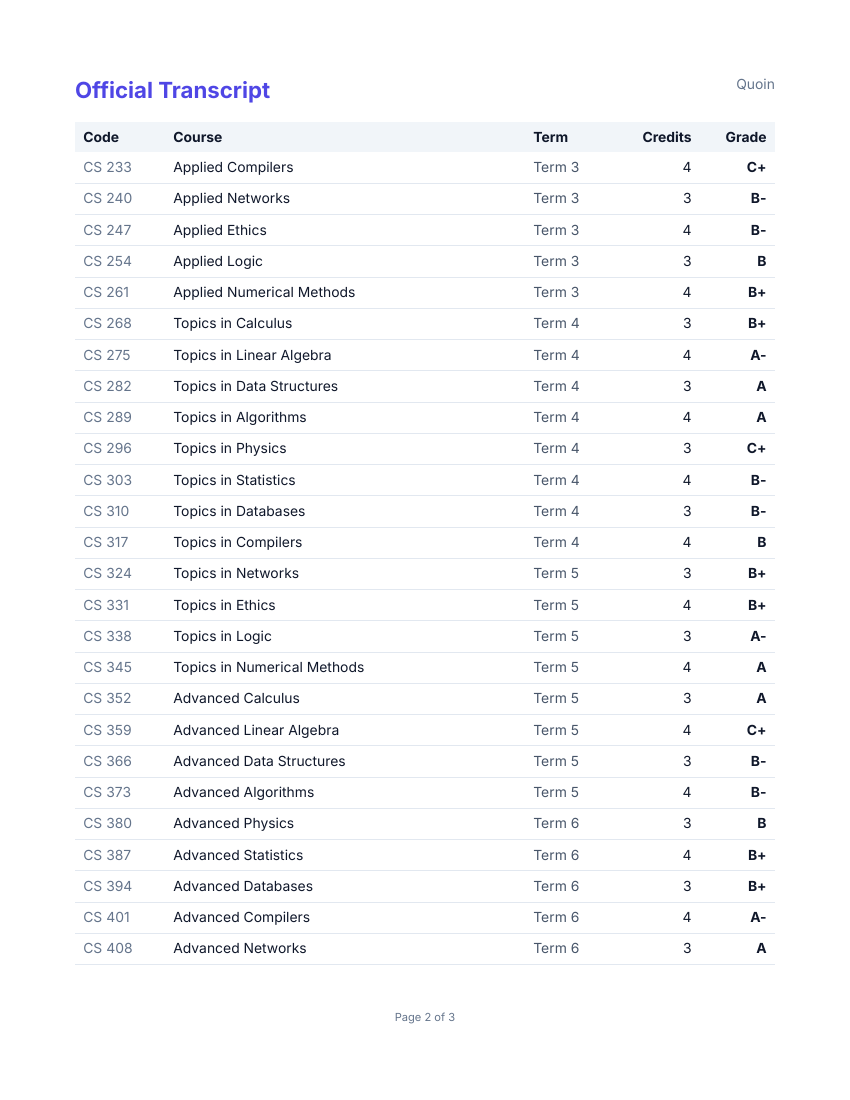
The 60 courses run over three pages. The header row repeats at the top of each one, and no row is cut in half at a page break.
Show the full source
<x-doc::document title="Official Transcript" author="Quoin">
<x-doc::page size="letter" margin="0.75in">
<x-slot:header>
<x-doc::row>
<x-doc::text size="16pt" bold color="indigo-600">Official Transcript</x-doc::text>
<x-doc::spacer />
<x-doc::text color="slate-500">Quoin</x-doc::text>
</x-doc::row>
</x-slot:header>
<x-doc::column gap="10pt">
<x-doc::column gap="3pt" padding="12pt" background="slate-50" radius="8pt" keep-together>
<x-doc::text size="16pt" bold>{{ $student }}</x-doc::text>
<x-doc::text color="slate-600">Student ID 2019-04417 | B.Sc. Computer Science | Enrolled 2019</x-doc::text>
<x-doc::row gap="8pt" margin="8pt 0 0 0">
@foreach ([['CREDITS', (string) $credits], ['GPA', number_format($gpa, 2)], ['STANDING', 'Good'], ['COURSES', (string) count($courses)]] as [$label, $value])
<x-doc::column gap="2pt" grow="1">
<x-doc::text size="8pt" bold color="slate-500">{{ $label }}</x-doc::text>
<x-doc::text size="13pt" bold>{{ $value }}</x-doc::text>
</x-doc::column>
@endforeach
</x-doc::row>
</x-doc::column>
<x-doc::h2>Course history</x-doc::h2>
<x-doc::table columns="0.9in 1fr 1in 0.75in 0.75in">
<x-doc::thead>
<x-doc::tr background="slate-100">
<x-doc::th>Code</x-doc::th>
<x-doc::th>Course</x-doc::th>
<x-doc::th>Term</x-doc::th>
<x-doc::th align="right">Credits</x-doc::th>
<x-doc::th align="right">Grade</x-doc::th>
</x-doc::tr>
</x-doc::thead>
@foreach ($courses as [$code, $title, $term, $cr, $grade])
<x-doc::tr border-width="0 0 0.5pt 0" border-color="slate-200">
<x-doc::td><x-doc::text color="slate-500">{{ $code }}</x-doc::text></x-doc::td>
<x-doc::td>{{ $title }}</x-doc::td>
<x-doc::td><x-doc::text color="slate-600">{{ $term }}</x-doc::text></x-doc::td>
<x-doc::td align="right">{{ $cr }}</x-doc::td>
<x-doc::td align="right"><x-doc::text bold>{{ $grade }}</x-doc::text></x-doc::td>
</x-doc::tr>
@endforeach
</x-doc::table>
<x-doc::column gap="4pt" padding="12pt" background="slate-50" radius="8pt" keep-together>
<x-doc::h3>Cumulative summary</x-doc::h3>
<x-doc::row>
<x-doc::text grow="1">{{ sprintf('%d credits attempted, %.1f quality points.', $credits, $points) }}</x-doc::text>
<x-doc::text size="14pt" bold>GPA {{ number_format($gpa, 2) }}</x-doc::text>
</x-doc::row>
</x-doc::column>
</x-doc::column>
<x-slot:footer>
<x-doc::page-number format="Page {page} of {total}" align="center" size="8pt" color="slate-500" />
</x-slot:footer>
</x-doc::page>
</x-doc::document>$courses, $credits, $points and $gpa come from your own data.
$stat = fn (string $l, string $v) => Column::make(
Text::make($l)->size(pt(8))->bold()->color('slate-500'),
Text::make($v)->size(pt(13))->bold(),
)->gap(pt(2))->grow(1);
$card = Column::make(
Text::make('Ada Lovelace')->bold()->size(pt(16)),
Text::make('Student ID 2019-04417 | B.Sc. Computer Science | Enrolled 2019')->color('slate-600'),
Row::make($stat('CREDITS', (string) $credits), $stat('GPA', number_format($gpa, 2)), $stat('STANDING', 'Good'), $stat('COURSES', (string) count($courses)))
->gap(pt(8))->margin(Edges::of(pt(8), pt(0), pt(0), pt(0))),
)->gap(pt(3))->padding(pt(12))->background('slate-50')->radius(pt(8))->keepTogether();
$table = Table::make()->columns('0.9in 1fr 1in 0.75in 0.75in')
    ->headerRow(TableRow::make(
        Text::make('Code')->bold(),
        Text::make('Course')->bold(),
        Text::make('Term')->bold(),
        Text::make('Credits')->bold()->right(),
        Text::make('Grade')->bold()->right(),
    )->background('slate-100'));
foreach ($courses as $c) {
    $table = $table->bodyRow(TableRow::make(
        Text::make($c[0])->color('slate-500'),
        $c[1],
        Text::make($c[2])->color('slate-600'),
        Text::make((string) $c[3])->right(),
        Text::make($c[4])->right()->bold(),
    )->borderWidth(Edges::of(pt(0), pt(0), pt(0.5), pt(0)))->borderColor('slate-200'));
}
$summary = Column::make(
Text::h3('Cumulative summary'),
Row::make(
Text::make(sprintf('%d credits attempted, %.1f quality points.', $credits, $points))->grow(1),
Text::make('GPA ' . number_format($gpa, 2))->bold()->size(pt(14)),
),
)->gap(pt(4))->padding(pt(12))->background('slate-50')->radius(pt(8))->keepTogether();
$document = Document::make(
Page::letter()->margin(in(0.75))
->header(Row::make(
Text::make('Official Transcript')->bold()->size(pt(16))->color('indigo-600'),
Spacer::flex(),
Text::make('Quoin')->color('slate-500'),
))
->body(Column::make($card, Text::h2('Course history'), $table, $summary)->gap(pt(10)))
->footer(PageNumber::make('Page {page} of {total}')->center()->size(pt(8))->color('slate-500')),
)->title('Official Transcript')->createdAt(new DateTimeImmutable('2026-01-01T00:00:00Z'));A Laravel route sends it to the browser as a PDF or as a Word file:
$transcript = Quoin::view('transcript', compact('student', 'courses', 'credits', 'points', 'gpa'));

return $transcript->pdf()->download('transcript.pdf');
// or, with quoin/docx installed: $transcript->docx()->download('transcript.docx');
Without Laravel, $document->toPdf()->save('transcript.pdf') writes the PHP version to a file, and ->stream() sends it to the browser. See more examples.
Built on php-pdf and php-docx
The layout engine decides where everything goes on the page. Writing the file is the work of two libraries by Denis Skripchenko: php-pdf writes every PDF, with its fonts, images, SVG, QR codes and encryption, and php-docx writes the Word files. Both are pure PHP and MIT licensed, and this project wouldn't exist without them.